| GINO Graphics Suite - GINO v9.0 |  |
 |
| GINO Graphics Suite - GINO v9.0 | |
|
Light exists in three forms, ambient, diffuse and specular, and objects will absorb or reflect different amounts of these different kinds of light giving a different visual appearance.
Ambient light is background light that doesn't have a particular source and is shining in all directions.
Diffuse light has a particular source and is reflected off a surface evenly. A surface will be brighter if it lies perpendicular to the direction of the light source.
Specular light is also directional, but it is reflected sharply in a particular direction. A surface will be brighter if the angle of the surface reflects the light source towards the viewer.
Thus, in a simple example, a blue object is one which reflects blue ambient and diffuse light, and is shiny if it reflects specular light.
In the real world, things are a little more complex, with objects reflecting some kinds of light and absorbing others, letting some colours pass through all together (transparency) or even emitting light. All of these features will be dealt with later when an object's material properties are described (see Material Properties).
GINO provides a single routine that is used to define up to 8 independent light sources of 4 different types:
gDefineLightSource(light, colour, ...)where light is the light number (1-8) and colour is the colour of the light source (which may be defined in terms of a colour index number or a 24bit RGB triplet (see Colour Definition)). The setting of additional optional arguments to this routine define the different types of light source.
With no extra arguments, the type of light defined is an ambient light, ie. one that has no specific source or direction.
For example:
[C/C++]
amb=gTrueCol(0.3,0.3,0.3);
gDefineLightSource(1,amb,0);
[F90]
amb=gTrueCol(0.3,0.3,0.3)
call gDefineLightSource(1,amb)
defines light number one to be an ambient light with 30% white light.
Adding a direction vector using the optional argument gDir, specifies a directional light source. This is one where the source of light is said to be an infinite distance away in the direction of the vector specified. The rays of light are parallel to each other travelling from the source along the vector (in the opposite direction to the vector itself). A directional light source will only illuminate the side of objects in some way facing the light source, which in any one scene will always be the same side.
For example:
[C/C++]
GPOINT3 vector = {100.0,0.0,0.0);

gDefineLightSource(1,5,
      gDir,vector,0);
[F90]
type (GPOINT3) :: vector = &
      GPOINT3(100.0,0.0,0.0)
call gDefineLightSource(1,5, &
      gDir=vector)
specifies a green directional light source at an infinite distance away along the X axis which will illuminate the right hand side of all objects in a scene..
Adding a 3D coordinate using the optional argument gPos, specifies a point light source at the specified position. Here the light is said to radiate out in all directions from the position of the light source and will therefore illuminate all objects with sides facing this position.
For example:
[C/C++]
GPOINT3 pos = {10.0,10.0,-10.0);

gDefineLightSource(1,10,
      gPos,pos,0);
[F90]
type (GPOINT3) :: pos = &
      GPOINT3(10.0,10.0,-10.0)
call gDefineLightSource(1,10, &
      gPos=pos)
specifies a white light located at (10.0,10.0,-10.0), which will illuminate all object surrounding this position.
A point light may also have two additional attenuation factors gAtten1 and gAtten2, which specify its constant and linear attenuation over distance from its source. These factors affect the light's strength according to the following formulae:
Attenuation factor = 1.0 / (gAtten1 + distance * gAtten2)
Unless specified otherwise, gAtten1 = 1.0 and gAtten2 = 0.0 which implies full strength and no fade over distance.
A spot light is one which has a narrower focus than a point light, and so needs both the gPos (to specify its position) and gDir (to specify its direction) optional arguments. Two additional optional arguments specify the concentration and spread angle of the spot light.
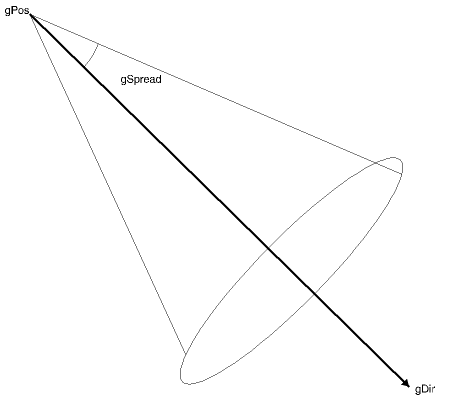 |
Spot light definition |
For example:
[C/C++]
GPOINT3 pos = {0.0,0.0,10.0),
        dir = (0.0,0.0,-1.0);

gDefineLightSource(1,10,gPos,pos,gDir,dir,
     gConc,100.0,gSpread,40.0,0);
[F90]
type (GPOINT3) :: &
   pos = GPOINT3(0.0,0.0,10.0),&
   dir = GPOINT3(0.0,0.0,-1.0)
call gDefineLightSource(1,10,gPos=pos,gDir=dir, &
      gConc=100.0,gSpread=40.0)
specifies a point light source at (0.0,0.0,10.0) shining along the Z axis. The concentration is set at 100% which is at full strength and the spread angle of the light source is set at 40 degrees. This means that there is no light emanating from this source outside a notional cone with a 40% internal angle.
Under normal circumstances, ambient lights emit ambient light whilst directional, point and spot lights emit diffuse light. It is possible, however, to add a specular colour component to any light source using the optional argument gSpec. This may be necessary to define a light source which contains high levels of specular light, for instance in a spot light.
In order to light up a scene, it is not enough to simply specify the required light sources. They have to be switched on as well! The routine to control the state of each of the defined light sources is:
gSetLightSwitch(light,switch)where light is the number and switch may be GON or GOFF. Note that, by default, all lights are switched off, so all objects will appear black until at least one light is switched on.
When GINO is initialised, two light sources are predefined. These may simply be switched on using gSetLightSwitch() or re-defined using gDefineLightSource(). The two lights are:
Light1: A white ambient light
Light2: A white directional light shining from 0.0,0.0,ZMAX
The complete set of attributes of any of the eight lights sources, including their state, may be enquired using the routine:
gEnqLightAttribs(light,attribs)where light is the light number and attribs is a structure of type GLITATT.
An example using material and lighting is shown below:
[C/C++]
#include <gino-c.h>
GDIM paper;
GLIMIT3  picture = {0.0,300.0,0.0,200.0,-1600.0,1600.0};
GLIMIT   viewport = {0.0,1.0,0.0,1.0};
GPOINT3  position = {0.0,500.0,100.0};
GPOINT3  direction = {0.0,-0.6,-1.0};
GMATSTY  material2;
GPOINT3  table[4] = {400.0,-25.0,-200.0, -400.0,-25.0,-200.0,
                    -400.0,-25.0,2000.0,  400.0,-25.0,2000.0};
#if defined(MWIN) || defined(WOGL)
int PASCAL WinMain (HINSTANCE hInstance, HINSTANCE hPrevInstance,
%%%%%% LPSTR lpszCmdParam, int nCmdShow)
#else
int main ()
#endif
{
   int ip;
   gOpenGino();
   gWogl(hInstance,hPrevInstance);
/* Set up viewport */
   gEnqDrawingLimits(&paper,&ip);
   viewport.xmax=paper.xpap;
   viewport.ymax=paper.ypap;
   gSetViewport3D(&picture,&viewport);
/* Define view */
   gDefineSphericalView(-50.0,50.0,100.0,350.0,0.5,-0.5,-1.0,200.0);
   gUpdateView();
/* Define lights */
   gSetShadingMode(GGOURAUD,gCulling,GBACK,0);
   gDefineLightSource(2,GWHITE,gPos,position,gDir,direction,
                        gConc,80.0,gSpread,100.0,0);
   gSetLightSwitch(1,GON);
   gSetLightSwitch(2,GON);
/* Define material */
   material2.ambient=0.3;
   material2.diffuse=0.6;
   material2.specular=1.0;
   material2.shine=80.0;
   material2.trans=1.0;
   gDefineMaterial(2,&material2);
/* Plot table */
   gSetMaterialIndex(1,1);
   gSetMaterialColour(gTrueCol(0.0,0.5,0.0),0);
   gDrawFacet(4,table,0);
/* Plot reds */
   gSetMaterialIndex(2,0);
   gSetMaterialColour(GRED,0);
   gDrawSphere(0.0,0.0,0.0,30.0,gUComp,25,gVComp,25,0);
   gDrawSphere(-60.0,0.0,0.0,30.0,gUComp,25,gVComp,25,0);
   gDrawSphere(-120.0,0.0,0.0,30.0,gUComp,25,gVComp,25,0);
   gDrawSphere(60.0,0.0,0.0,30.0,gUComp,25,gVComp,25,0);
   gDrawSphere(120.0,0.0,0.0,30.0,gUComp,25,gVComp,25,0);
   gDrawSphere(-90.0,0.0,52.0,30.0,gUComp,25,gVComp,25,0);
   gDrawSphere(-30.0,0.0,52.0,30.0,gUComp,25,gVComp,25,0);
   gDrawSphere(30.0,0.0,52.0,30.0,gUComp,25,gVComp,25,0);
   gDrawSphere(90.0,0.0,52.0,30.0,gUComp,25,gVComp,25,0);
   gDrawSphere(-60.0,0.0,104.0,30.0,gUComp,25,gVComp,25,0);
   gDrawSphere(60.0,0.0,104.0,30.0,gUComp,25,gVComp,25,0);
   gDrawSphere(0.0,0.0,104.0,30.0,gUComp,25,gVComp,25,0);
   gDrawSphere(-30.0,0.0,156.0,30.0,gUComp,25,gVComp,25,0);
   gDrawSphere(30.0,0.0,156.0,30.0,gUComp,25,gVComp,25,0);
   gDrawSphere(0.0,0.0,208.0,30.0,gUComp,25,gVComp,25,0);
/* Plot pink */
   gSetMaterialColour(gTrueCol(1.0,0.8,0.8),0);
   gDrawSphere(0.0,0.0,268.0,30.0,gUComp,25,gVComp,25,0);
/* Plot black */
   gSetMaterialColour(GBLACK,0);
   gDrawSphere(0.0,0.0,-60.0,30.0,gUComp,25,gVComp,25,0);
/* Plot blue */
   gSetMaterialColour(GBLUE,0);
   gDrawSphere(0.0,0.0,460.0,30.0,gUComp,25,gVComp,25,0);
/* Close down */
   gSuspendDevice();
   gCloseGino();
}
[F90]
Program snooker
use gino_f90
type (GDIM) paper
type (GLIMIT3) :: picture = GLIMIT3(0.0,300.0,0.0,200.0,-1600.0,1600.0)
type (GLIMIT) :: viewport = GLIMIT(0.0,1.0,0.0,1.0)
type (GPOINT3) :: position = GPOINT3(0.0,500.0,100.0)
type (GPOINT3) :: direction = GPOINT3(0.0,-0.6,-1.0)
type (GMATSTY) :: material2
type (GPOINT3) :: table(4) = (/ &
  GPOINT3(400.0,-25.0,-200.0), GPOINT3(-400.0,-25.0,-200.0), &
  GPOINT3(-400.0,-25.0,2000.0), GPOINT3(400.0,-25.0,2000.0) /)
!
   call gOpenGino
   call xxxxx
!
! Set up viewport
   call gEnqDrawingLimits(paper,ip)
   viewport%xmax=paper%xpap
   viewport%ymax=paper%ypap
   call gSetViewport3D(picture,viewport)
!
! Define view
   call gDefineSphericalView(-50.0,50.0,100.0,350.0, &
                             0.5,-0.5,-1.0,200.0)
   call gUpdateView
!
! Define lights
   call gSetShadingMode(GGOURAUD,gCulling=GBACK)
   call gDefineLightSource(2,GWHITE,gPos=position,gDir=direction, &
                             gConc=80.0,gSpread=100.0)
   call gSetLightSwitch(1,GON)
   call gSetLightSwitch(2,GON)
!
! Define material
   material2%ambient=0.3
   material2%diffuse=0.6
   material2%specular=1.0
   material2%shine=80.0
   material2%trans=1.0
   call gDefineMaterial(2,material2)
!
! Plot table
!
   call gSetMaterialIndex(1,1)
   call gSetMaterialColour(gTrueCol(0.0,0.5,0.0),0)
   call gDrawFacet(4,table)
!
! Plot reds
!
   call gSetMaterialIndex(2,0)
   call gSetMaterialColour(GRED,0)
   call gDrawSphere(0.0,0.0,0.0,30.0,gUComp=25,gVComp=25)
   call gDrawSphere(-60.0,0.0,0.0,30.0,gUComp=25,gVComp=25)
   call gDrawSphere(-120.0,0.0,0.0,30.0,gUComp=25,gVComp=25)
   call gDrawSphere(60.0,0.0,0.0,30.0,gUComp=25,gVComp=25)
   call gDrawSphere(120.0,0.0,0.0,30.0,gUComp=25,gVComp=25)
   call gDrawSphere(-90.0,0.0,52.0,30.0,gUComp=25,gVComp=25)
   call gDrawSphere(-30.0,0.0,52.0,30.0,gUComp=25,gVComp=25)
   call gDrawSphere(30.0,0.0,52.0,30.0,gUComp=25,gVComp=25)
   call gDrawSphere(90.0,0.0,52.0,30.0,gUComp=25,gVComp=25)
   call gDrawSphere(-60.0,0.0,104.0,30.0,gUComp=25,gVComp=25)
   call gDrawSphere(60.0,0.0,104.0,30.0,gUComp=25,gVComp=25)
   call gDrawSphere(0.0,0.0,104.0,30.0,gUComp=25,gVComp=25)
   call gDrawSphere(-30.0,0.0,156.0,30.0,gUCcomp=25,gVComp=25)
   call gDrawSphere(30.0,0.0,156.0,30.0,gUComp=25,gVComp=25)
   call gDrawSphere(0.0,0.0,208.0,30.0,gUComp=25,gVComp=25)
!
! Plot pink
!
   call gSetMaterialColour(gTrueCol(1.0,0.8,0.8),0)
   call gDrawSphere(0.0,0.0,268.0,30.0,gUComp=25,gVComp=25)
!
! Plot black
!
   call gSetMaterialColour(GBLACK,0)
   call gDrawSphere(0.0,0.0,-60.0,30.0,gUComp=25,gVComp=25)
!
! Plot blue
!
   call gSetMaterialColour(GBLUE,0)
   call gDrawSphere(0.0,0.0,460.0,30.0,gUComp=25,gVComp=25)
!
! Close down
   call gSuspendDevice
   call gCloseGino
   stop
   end
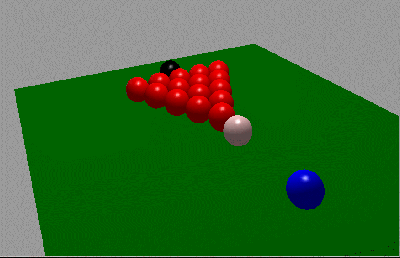 |
Snooker Balls |
It should also be noted that, increasing the number of lights that are used (i.e. switched on), increases the time taken to calculate the correct colour of the objects being displayed.